
Resonance: A Plague Tale Legacy Photo Mode Guide
Free camera, focal length, exposure, and timeline-aware framing for Sophia's prequel — confirmed day one by Asobo.
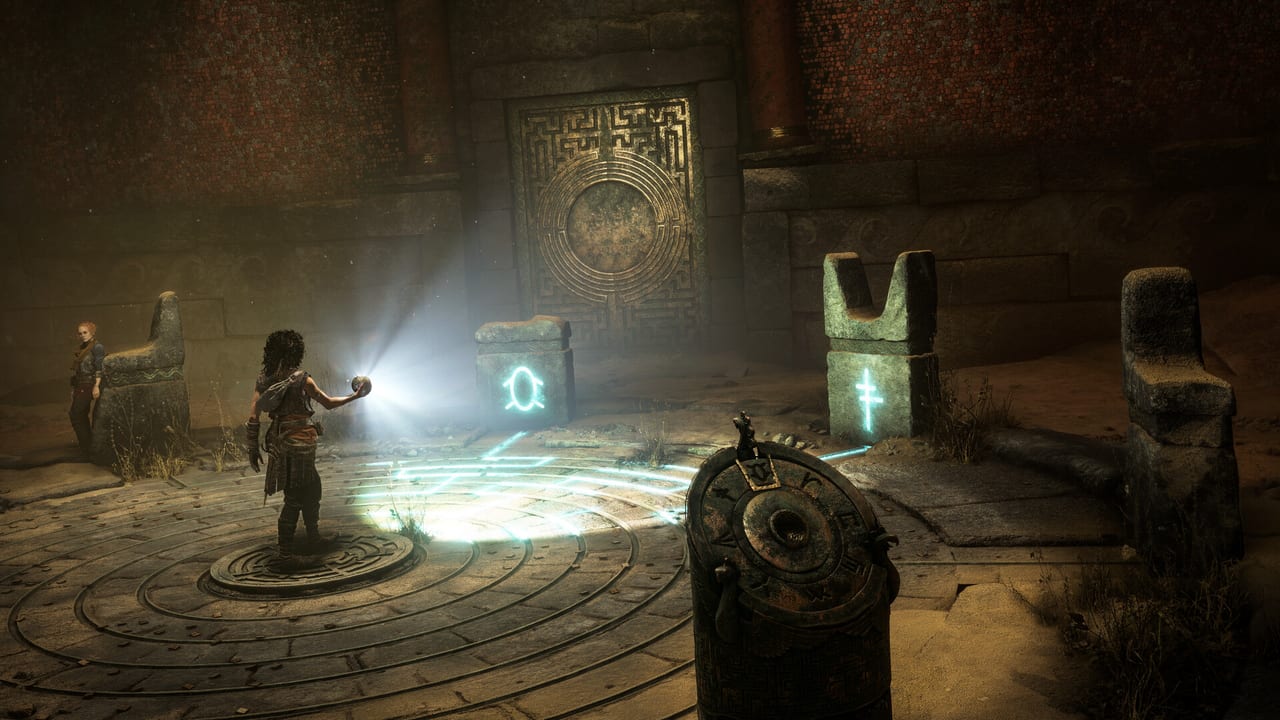
Asobo Studio confirmed during the “The Scenery” featurette in July 2026 that Resonance: A Plague Tale Legacy will ship with a fully operational Photo Mode on day one. This is a deliberate response to long-running community feedback about the previous A Plague Tale games, which launched without a dedicated camera tool despite the series’ reputation for cinematic art direction.
If you came here looking for a tool that scrapes a damage formula or generates a build calc — that is not what this page is. The page covers the actual photo-mode feature: confirmed scope, likely controls, the dual-timeline trick, and how to use it on each platform. Spoiler-free framing tips are on the collectibles route page.
What Asobo has confirmed
The “The Scenery” featurette deliberately focuses on the studio’s environmental strengths: Venice canals in 1334, the central “camp” hub on Crete, the Minoan amphitheatres, and the subterranean “eerie places” where the Macula-corrupted lairs. Alongside that footage, Asobo confirmed that Photo Mode is enabled at launch and tied to the game’s broader visual identity. You can pause Sophia at any point outside combat and open the photo menu from the pause screen.
This is the first Plague Tale game to launch with a built-in Photo Mode, which is significant given how heavily the series leans on cinematic framing. Previous games relied on community-made tools and external photo apps; this time the studio is shipping it.
Expected controls (industry standard)
Asobo has not published an exhaustive control list, but the Photo Mode follows the same skeleton used by A Plague Tale: Innocence, A Plague Tale: Requiem, and other Asobo titles (such as the Microsoft Flight Simulator camera). Expect:
- Pause / open — Press a shoulder button or open the pause menu and select Photo Mode.
- Camera orbit — Right stick (controller) or mouse drag (keyboard).
- Camera elevation / dolly — Triggers or keyboard hotkeys.
- Focal length slider — Wide-angle through telephoto.
- Depth of field — Aperture-style slider, focus point picker.
- Exposure / brightness — Multi-stop slider for HDR scenes.
- Field of view — Toggles for ultrawide ratios (the game supports 21:9 Hor+ on PC).
- Color grade / filter presets — At least three to four named presets for the Mediterranean setting.
- Hide HUD / Sophia — Toggle the protagonist out of frame for pure landscape shots.
- Save to disk — Output PNG / JPG to your platform’s screenshot folder.
The exact binding list will vary between PC, PS5, and Xbox Series. The controls page will mirror the in-game remap once verified. On PC, the file output path is the same as any screenshot folder configured in the OS.
The dual-timeline “Resonance” photo trick
This is the bit Photo Mode coverage of A Plague Tale Legacy keeps coming back to. The game’s defining mechanic is that Sophia can shift between 1334 (her own time) and ancient Minoan-era sequences, where the original Prima Macula curse played out centuries earlier. Environments, lighting, and architecture change drastically between the two eras.
If Photo Mode lets you freeze a shot and toggle between timelines, a single frame can compare a ruined Minoan palace in Sophia’s era against its pristine golden-age state. Asobo has not officially confirmed this — the studio said Photo Mode is “available day one” without detailing whether the timeline toggle freezes during a photo session. However, the underlying Resonance mechanic is already a pause-and-swap effect in gameplay, so it is the most reasonable expectation. If the toggle is disabled inside Photo Mode, you can fake it by taking paired shots on either side of a timeline shift.
Best locations to shoot
From the featurette and IGN preview coverage, the strongest backdrops are:
- Venice canals at golden hour (Chapter 1 / 2). The opening chapter is a Mediterranean palette that reads well in any color grade.
- The Camp cliffside overlooking the island (mid-game hub). Wide vista framing — pull back to telephoto to compress the cliffs.
- Minoan amphitheatres under shafts of light (Chapters 4 and 6). The pillars and reflective marble are perfect for depth-of-field shots.
- Subterranean cisterns lit only by the Minoan orb (Chapters 8 to 13). The orb glow against total darkness is the strongest black-background composition in the game.
- The bridge near Chapter 11’s golden ring puzzle. The ring itself reflects Sophia as you walk along the perimeter.
Avoid trying to use Photo Mode during combat encounters or creature chase sequences — the game will not let you freeze those. The chase scenes are scripted and pull you back into scripted animation.
Using the photo folder
Saved photos on PC land in the standard Pictures folder or wherever Windows / Steam redirects screenshots. On PS5, the system captures into the Media Gallery. On Xbox Series X|S, the captures go to the Xbox Captures app. Cross-platform shares are not auto-synced; a photo you take on PS5 will not appear on Steam Cloud or Game Pass. Treat each storefront’s photo library as separate.
If you want to publish shots externally, export them first, then upload. The in-game camera does not push to social media automatically — that was a stretch rumor that never had an Asobo source.
Quick FAQ
- Is Photo Mode available at launch? Yes. Asobo confirmed day-one availability in the “The Scenery” featurette.
- Does it pause time? Yes. The game is paused while you adjust the camera.
- Can you hide Sophia? Most likely yes via a “hide character” toggle — the standard for any Asobo Photo Mode since Flight Simulator.
- Does it work in chapter-select replays? Yes, but only when not in scripted chase or combat animations.
- Will my photos be flagged by Steam moderation? No. Local saves only.
If Photo Mode controls or output paths change after a future patch, this page will be updated. The updates page tracks patch notes by build.
Frequently Asked Questions
Quick answers to the most common questions.
Is Photo Mode in Resonance on day one?
Yes. Asobo confirmed it in the "The Scenery" featurette ahead of the 27 August 2026 launch.
Can you toggle the dual-timeline Resonance effect inside Photo Mode?
Asobo has not officially confirmed it, but it is the most-requested community feature. As a fallback you can take paired shots on either side of a timeline shift.
Does Photo Mode work on Steam Deck?
Yes. The game runs on Steam Deck and Photo Mode is part of the pause menu. See performance for Deck preset notes.
Where do my photos save on PC?
By default in the OS Pictures folder, or wherever Steam redirects screenshots. Cross-storefront saves are not synced.
Does Photo Mode pause combat?
Yes — but only when combat is not actively scripted. You cannot open Photo Mode during creature chase sequences.